Saturday, July 17, 2021

MSRP vs RETAIL Price


 Ok, Here is a thing I deal with every day. MSRP vs RETAIL (or as is it referred to in the industry ADDENDUM). 


Customer comes in and looks at a car and drives it, falls in love, and wants to know the price. I take them to the window sticker and show them.  It's then that the majority will look at the MSRP on the factory sticker and assume that it the price (Plus Tax and finance).  I point out the retail price which (at EVERY dealership you visit) is where the market adjustment, and dealer options are listed.  So, let's say the MSRP on a car is $24,445. MSRP stands for Manufacturer SUGGESTED Retail Price.  Keep in mind that the manufacturer does not sell cars. They get paid by the dealership (invoice) who puts the car in inventory to sell.  Many consumers are under the false impression that the retailer has thousands of dollars between invoice and MSRP. I know with Kia it's about 800.00.  Any dealership that sells for MSRP will go broke in a short time.  

Think of it this way. When you go to XYZ big box store to buy a TV, there is a retail price on that TV. Let's say $2300.00.  You go in and pay $2300.00 plus tax. No haggling.  What you don't think about is the fact that Big Box paid, let's say $1700.00 for it invoice. The MSRP may be $1850.00.  The Big Box adds a market adjustment to bring the retail amount to the $2300.00 that you see. They have a sale, and the 30% off comes out of profit margin, not off MSRP.  This is BASIC BUSINESS.  Jewelry, furniture, electronics, phones, everything you buy has a mark-up retail. Ask a Mom and Pop business. When I sold Concrete statuary, my markup was almost 150% of wholesale. It's what the market would bear, and I was competitive with other dealers. It was more than just what I paid vs. what I was selling for. I had delivery expenses, insurance and time and labor. It's the way retail works. If I bought a piece for 30.00 and sold it for 35.00 I would be broke in a month. If I sell that piece for 100.00, I stay in business. 

Car dealerships are, under law, required to show you the MSRP. No one else in the Big Box retail industry has to disclose their MSRP.  So when a car buyer says they are not paying that "bullshit" mark-up price, I tell them to go to Big Box store and tell them you are not paying the $2300.00 for the TV. The store will tell you to have a nice day.

 A dealership will negotiate price, but it will be off retail price. That's the way car sales works. Everyone wants to pay rock bottom for a car. Granted. We understand that. We will work with you. Consumers have to understand that retail is retail. It's what the car sells for to be competitive in the market. YES, it is a profit margin. We are not trying to hide that. 

So, cut a little slack. It is not the sales person trying to screw you, it's not the dealership trying to screw you, it's not the manufacturer trying to screw you. It's just the cost of doing business and keeping the lights on. I have been the buyer many times, and I too try to get a discount of some kind. I know that anything they give me comes out of profit. Again, that's business. I also know that the sales guy has to eat too.  If you don't want to pay retail, stay in the car you have. Right now with inventories suffering worldwide, priced and "markups" are higher. Businesses have a monthly expense "nut". (just like you having to pay rent. It needs to be there).  The only way to do that selling less units is to ask more for the car. You will either pay it or not. Up to you. We still have to keep the lights on. 

I hope this clears a few thing up. Bottom line is, we want YOU to be happy and WE need to be happy too. 

Have a KIA Day!

Wednesday, May 5, 2021

I am
now the new Face Of Jim Marsh Kia! If you don't drive here, You can't save here!


Saturday, March 20, 2021

zombie debt and your credit


As part of what I do, I try to answer questions  about your credit. Credit, of course is a very important part if purchasing  a new car. Some of us have old debt that comes out of the grave. It's called zombie debt. Here is a very good article about what it is and how to deal with it. Have a Kia Day!

Sunday, February 28, 2021

Wednesday, February 24, 2021

Kia auto shutoff feature video


Here is a video link explaining the Kia auto shutoff system

 https://youtu.be/NtTm2ATTKsA


Have a Kia Day

Wednesday, July 29, 2020

Some new contact information

Hi Everyone. Lots going on in the Kia world.  We have the New Seltos, which is a great little CUV. It fits in the family between the Soul and the Sportage. And NOW we have the new Kia K5, which replaces the ever stoic Optima. Keep on mind that this is a totally new car. It is NOT a redesigned Optima, though it replaces it in the lineup. It is Optima-ish, but comes in a 1,6 Turbo and soon to arrive the 2.5 Turbo. It's a Beautiful machine for the 2021 Kia lineup.


 Loaded with the latest safety features and driver comfort features. I LOVE this car. The nice thing about it too is that Kia has kept it in the same price range as the Optimas past.

As Always, I am available here. Just post questions below.  If you are in Las Vegas, stop in and say Hi!! I have a new facebook page as well....facebook.com/Roncashtwist   and twitter: Cashatkia  Email: cashatkia@gmail.com

Have a Kia Day!!

Saturday, November 23, 2019

Why is Kia called Kia? An Article by Adam Lang


How does a hamster sell a car? The answer can be found in Kia’s ‘Power to Surprise’ ad.
Kia’s humble history dates back to 1944. Founder Kim Chul Ho was born in Korea in 1905. As a teenager, he moved to Japan and worked in a steel mill. Later, he set up a business making nuts and bolts for bicycles in Osaka. Kim returned to Korea in 1944 and founded Kyungsung Precision Industry to manufacture bicycle parts and steel tubing. One year later, the company set up a factory outside of Seoul and became Kia.
Kia proudly introduced the first Korean-made bicycle in 1952. Materials were in short supply during the war. This did not deter Mr. Kim. He used oil drums and wire rope when steel was not available. Demand for bicycles increased after the Armistice Agreement and the bicycle company took the new name Samchuly.
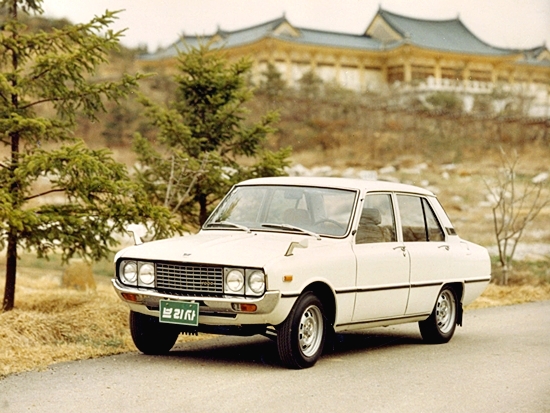
Mr. Kim’s vision went beyond bicycles. Kia produced South Korea’s first motorcycle in 1961 and small trucks followed. Mr. Kim died in 1973, one year before Kia released their first compact car, the Kia Brisa.
kia brisa early cars1
Source: Kia Buzz

Why is it Called Kia?

Contrary to common thought, Kia is not an acronym. Kyungsung Precision Industry took the aspirational name ‘Kia’ from Chinese-Korean characters. Ki “起” means “to rise, stand or awake”  and A  “亚” refers to Asia. So, in Korean, the name Kia means “to rise out of Asia.” Kia’s early logos show a geometric K with a curved wave across the top. Otherwise, the logo has remained consistent since 1994 – with block capital letters spelling KIA in English surrounded by an oval. Interestingly enough, KIA cars sold in Korea have a different logo.
pasted image 0
Source: Car Logos
Kia cars were first sold in America in 1994. They made headway as an inexpensive option with a high warranty value. However, they faced serious reliability and durability challenges. A few years later, the Asian economic crisis devastated Kia. In 1997 Korean automaker Hyundai won the auction (and beat out Daewoo Motor Company) to acquire Kia Motors Corporation.
The New Kia
Within 10 years, Kia would rise again. To succeed, the company had to improve their ratings, reputation, and become distinctive in their own right. In 2004, Kia initiated a complete overhaul. For design matters, they hired Chief Designers Peter Schreyer from Volkswagen and Tom Kerns from Cadillac. The entire Kia line was redesigned top to bottom and they adopted “The Power to Surprise” as their new slogan.
Schreyer led a full on design revamp. The grill got a distinctive makeover known as the ‘tiger nose.’ Added to their new ‘simplicity of the straight line’ design philosophy, major engineering advances, and worldwide critical acclaim – the new  Kia had arrived. Another big milestone for Kia was the introduction of the Kia Soul, a car with personality. Kia struck gold with David & Goliath, a Los Angeles-based Ad Company in 2009. A series of ads featuring hamsters introduced the Kia Soul with tagline, “a new way to roll.”
The award winning ads, backed with “Do What You Do” by Marz and The Black Sheep’s “The Choice is Yours” have had millions of views. Kia launched the new Soul Turbo in 2017 with a baby hamster keeping pace to Motorhead.
From bicycle parts to over 3.3 million vehicles sold worldwide. Today, Kia is one of the ten most awarded brands by Kelly Blue Book for 2017. Kia continues to be headquartered in Seoul with 14 manufacturing facilities in 5 countries, including a large plant in West Point, Georgia.  We hope you enjoyed the naming story behind Kia’s brand name! Tell us, have you noticed the tiger nose? Do you have a favorite Kia hamster commercial? Let us know in the comments below!

Friday, November 22, 2019

GDI SERVICE ... THIS IS IMPORTANT TO DO...READ ON

I recently got a call from a customer of mine asking if the GDI service was something that was necessary for his Kia Optima.  He went on to say that the service writer had told him it was something he should do about every 15,000 miles or so. He was concerned that it was just something that they were selling that was not necessary. It's not outlandish as far as cost to have it done, though it can cost a bit for the service. Short answer here is YES, you really should have it done. The once a year cost to have the GDI service done is so worth it.

I had my Stinger GDI service yesterday. It has about 16,000 miles on it. The before and after was astonishing.  

What is GDI?  GDI stands for Gas Direct Injection. Simply put, your fuel delivery is injected straight into the cylinder (combustion chamber) rather than going through the intake valves as on a traditional engine. Bottom line, there is a trade off. As much as the GDI system is more efficient for fuel delivery and mileage, more responsive when you jump on the gas, it is a carbon builder. Carbon builds up on the valves and in the combustion chamber. Much like when you get sinus build up and can't breathe. Think of GDI service as a big dose of decongestant. Nothing feels better after having a bad head cold than being able to breathe again. 

When your engine can breath it feels better....like its old self.  Again, the results are like day and night.  We drive our GDI cars and over time lose a little power and performance .... We really don't even notice...We forget what that car drove like the day we purchased it. We get our oil changed, our tires rotated, filters changed and we just go on with life. 

So, I brought my car to my service department at Jim Marsh Kia, and had the service done. I wanted to see for myself if there was any difference in performance before and after. Let me tell you...When I drove home last night, it was amazing. The car performed like the day it rolled off the showroom floor.  I walked in this morning and the service manager, Blair, has this grin like "I told you...." and yes, he told me. 

GDI service is every bit as important as oil changes and should be part of your regular service schedule. Every 15,000 miles is what they recommend. Obviously the longer you wait, the more build up and the harder to do a thorough cleaning.  Prepare for an OMG moment after this service.  If you own a Kia with a GDI engine, and have not had this done, you need to get with your Kia service Department and schedule a time. It takes a couple of hours or so to do so bring a book to read.  If you don't get it done, your are doing a huge dis-service to yourself, your car and your wallet.  unaddressed engine carbon deposits can lead to expensive problems down the road.  In the Vegas area, call Jim Marsh Kia (702) 946-1000 and ask for the service department. They will schedule your GDI service appointment. 

As always, I am available to answer your KIA questions right here, or you can email me at: cashatkia@gmail.com, or just come by Jim Marsh Kia  8555 West Centennial Pkwy, Las Vegas and say Hi!

Have a KIA DAY!!

Friday, November 1, 2019

Adjusting your clock

It's that time again. Time to re-set your clock in your Kia. We are going to kill two birds with one stone here.  Here are instructions for setting to daylight savings time (which you will need in the spring). To "fall back" follow these steps and UN-CHECK the daylight savings time box. That will bring you back to standard time. Pretty simple.

As always, you can leave a question here, and I will answer it!  Thanks for visiting, and have a KIA Day!!

How to Adjust the Clock in Your Kia for Daylight Saving Time

To begin the process of adjusting your clock, make sure your car is either ON or in the ACCESSORY position. Find a safe spot to stop before you start going through the next steps.

Adjusting Time Via the UVO Infotainment System

  • Press the Setup button on your instrument panel
  • Select the Clock button on the touchscreen
  • Set Daylight Saving Time to "On"
  • Clock will adjust automatically

Adjusting Time Via Apple CarPlay and Android Auto

  • Touch the gear-shaped Setup button on your touchscreen
  • Swipe to the next page and select Date and Time
  • Turn Daylight Saving Time on to automatically adjust time
And that's how you adjust your clock for Daylight Saving Time! Be sure to make the adjustment for March and November to avoid one of those awkward hour-off moments.

Thursday, August 15, 2019

A word about smart keys

Smart Keys are all the rage.  A few things about your smart key.  You can unlock your car and start it without ever taking that key out of your pocket.  To unlock your car, just walk up with your key in your pocket or purse and press the button on the door handle. Once for the drivers door and twice to unlock all the doors. As long as the key in within about 3 feet of the driver's door it will work. If it does not unlock the door, it indicates a weak fob battery. Simple to replace, just bring it to your Kia dealership or any auto parts store.  

If your battery is too low to enter the car, simply take the hard key out of the fob. Push the small button on the fob and slide they key out.  Use it to unlock the door. Then push the start button WITH THE FOB and the car should start. 


I always recommend that you keep a key next to your bed.  Should you ever have an intruder or medical emergency, you can always hit the panic button on the fob to draw attention to your emergency.

Also, NEVER keep your fob next to any exterior wall or near your front door.  There are people that can access the key code that your fob transmits to unlock and start your car.  As great as these keys are, like anything else, they have their shortcomings.  Keep your key somewhere in the center of your house, or you can get an aluminum box that will block the signal. They are available on line. 

All in all, push button start and smart keys are great.  Rumor is the next step with be bio-metric ID to start and unlock your car with a finger print, much like many smart phones.  Some upper Luxury Brands are already doing this. 

As always, should you have any questions or comments, leave me a note here... or email me at cashatkia@gmail.com

Come see me any time at Jim Marsh Kia, West Centennial in Las Vegas, NV

Have a KIA day!!

Friday, April 26, 2019

Kia Telluride

Hello boys and girls, if you haven't heard about the Telluride you've probably been asleep or under a rock somewhere. I've been selling Kia for 7 years and I have seen the introduction of many models... the K900, the Cadenza, the Niro, the Stinger (which I drive), and now the Kia Telluride which is our full-size SUV with 7 and 8 passenger capability. Price wise it's in line with the top end Kia Sorento SXL at around $50,000 for the fully equipped and in the upper 30s for the LX model which is also nicely equipped, beautiful vehicles.
Some of the features you'll find in the new fully equipped Telluride include video blind spot for left and right side where a picture of whatever is in your blind spot shows up in the middle of your instrument cluster ... captains chairs in the middle with  heated and cooled seats... also premium suede headliner a TalkBack feature which allows you to press a button on the dashboard and talk to your third row passengers without having to turn around and yell at them. it allows you to calmly say "Kids, don't make me come back there".... And allows them to talk back to you with such smart comebacks as" well he started it". You will also notice the enhanced entertainment system screen which now comes in a triple screen mode where you can have three things on the screen at once, plus you also get the added feature of the 360° surround view camera.

Another great thing that's featured on the S models and above include the smart driver pack which includes blind spot indicator, active Lane change warning indicators, Lane keep indicator, autonomous emergency braking, and of course smart cruise control.
all of these things help you to be more aware of what's going on around you on the road. All in all this is one of the best SUV values on the market for the price.  The best thing to do is just come into the dealership and test drive one.

 I rarely dedicate my blogs to promoting a specific model or a specific buying motif, But  I must tell you I've never seen an outpouring of clients for a single new vehicle introduced through the key line as I have with the Telluride. I cannot keep them on my lot. I'll get 5 in today and I'll have one left tomorrow. T
hey are available to pre-order but the best thing to do is keep your eye on the JimMarshKia.Com website and see when we have them in and then come on in and see what we can offer you for lease or purchase. If you live outside of Las Vegas visit your Kia dealership wherever you are and get more information on this amazing vehicle. Remember you can always get a hold of me right here on this blog page or you can email me at cashatkia@gmail.com

As always have a Kia day!


Thursday, January 31, 2019

Again with the spare tire!

Just got a call from a customer who was "venting" about no spare tire. As a sales professional, I point out to ALL my customers that many new cars do not come with a spare tire. You will find instead a 'Tire Mobility Kit' which consists of a compressor to refill the tire and a can of sealer.  This will enable you to re inflate the tire (as long as it is a puncture and not a blowout or sidewall damaging hole) and get to your nearest Kia dealership. Calling Kia Roadside assistance (1800-333-4KIA) will get you help in using the kit if you are unsure of your ability to do it.  If you have a catastrophic tire issue, they will tow you to the nearest Kia dealership / service center. 

This being said, if you do not know if you have a spare or not, go check. If you need a spare tire you can purchase a spare tire kit from a Kia parts department, or through your local tire center.  

There is a reason that many cars come sans spare.  It is a weight thing. In order to stay within Federal fuel efficiency standards, many manufacturers (not just Kia) are loosing the spare. The theory is that the extra 30-40 pounds of weight makes a difference in the long haul on fuel consumption.  One of the other ways they are doing this is by instituting the Idle-stop-and-go system that shuts your car down at red lights, and restarts the engine when you take your foot off the brake. I personally hate this feature, and turn it off.  I am old school...If I am at a light and the car quits running, my brain goes in to panic mode....'Something is wrong...' but that's just me and a topic for another blog. 

Remember, you can get ahold of me here with questions or comments. I will do my best to answer any questions you have. 

Have a Kia Day   #Yesitiz

Friday, January 18, 2019

Some more Smart Trunk Tips

I have had several people ask about the Kia SMART TRUNK / TAILGATE.  Some clients don't even know they have it.  Remember to set it up in your SETTINGS so that when you walk up to back of the car, the trunk or power liftgate will open automatically.  (Found on EX models and above)


To maximize the Smart Trunk feature understanding:
IQS Tips
  • This feature can be activated in the instrument cluster settings menu (default setting from the factory is OFF). To enable the Smart Trunk, go to User Settings in the LCD Instrument Cluster modes.
  • When the Smart Key fob is in your possession and you are near the back of the vehicle, within close proximity, the hazard lights will blink and a chime will sound for about 3 seconds as an alert that the Smart Trunk is about to open. Then the alert system will blink and chime two additional times before opening the Trunk. Once you are finished, simply close the rear trunk and it will lock automatically when you walk away.

KEY REMINDERS 

The Smart Trunk feature will not operate: 
  • If doors are recently closed and locked upon exiting the vehicle. The Smart Key will be detected for 15 seconds within close proximity of the door handles (60 inches)
  • When a door is not locked or closed
  • When the Smart Key is in the vehicle
For additional information on the Smart Trunk operation, please refer to the vehicle Owner’s Manual.

Thursday, January 17, 2019

A Good Video For Lease Returns

So your lease is coming to an end, and you are wondering what you need to do. Here is a great, short video from Kia going through it step by step. 

Lease return video..What You need to know

Also this just came thorough. Good Information:

Kia Finance customers who are affected by the current government shutdown and need assistance can contact customer support at 1-866-331-5632


Don't forget I am here for you if you have any questions.  Stop By Jim Marsh Kia in Las Vegas and let me put you in your next KIA!!


Have a KIA DAY!

Saturday, December 1, 2018

Automatic Climate Control System Tips

Here are some great tips right from the Kia Sales Training site that I thought I would share with you. With Winter coming up, you might run into fogging etc.


ISSUE Windows Fog Up REMEDIES •

Use of the Automatic Climate Control System to defog the windows.
 Climate Control Auto Function:
1. Press AUTO to select Full Auto Operation - The AUTO setting automatically controls the airflow modes, fan speeds, air intake and air conditioning, according to the temperature setting selected.

 2. Set desired Temperature.

 3. Press SYNC to select Dual Temperature Control Operation.

 Defrost Outside Windshield: 1. Set Fan Speed to the highest position.

 2. Set Temperature to Hot. 3. Press the Front Defrost button. Defog Inside Windshield: 1. Set Fan Speed to desired position. 2. Set desired Temperature.

 3. Press the Front Defrost button. • Point out that the defogger will automatically activate as needed when the Climate Control System is set to AUTO.

REMINDERS • Warm air may flow in through vents if Recirculated Air button is not pressed ON (LED lit).
• Pressing any button during AUTO operation will deactivate the AUTO function and switch to manual mode, except for Temperature Control or SYNC Temperature Control.
 • When in AUTO mode, Air Flow Mode and Fan Speed do not display on the Climate Control Display. QUICK TIPS
 • Defrost Mode activates A/C and opens Fresh Air Vent to help dehumidify the air and improve Defroster performance.
 • During AUTO operation the A/C indicator will NOT illuminate. The fan speed, air intake, airflow and air conditioning may automatically be engaged at any time to reach desired temperature and reduce humidity.
 • Keep inside glass as clean as possible to reduce window fogging.

Hope that clears some things up (lol) ... Remember, your AUTO temp setting is like your home heating and cooling system. Set the temperature and it will keep it at that temperature in the cabin.

Remember, you can alway reach me here on the blog site, or visit me at Jim Marsh Kia in Las Vegas, Nv.  Email me at :    cashatkia@gmail.com

Have a Kia Day!

Wednesday, September 5, 2018

SOME OVERALL KIA SETTINGS TIPS

There are a multitude of settings in 'user settings' screen.  Here are some tips that will work for you. You may or may not have all of these, but most Kia cars have at lease some of them.  These are based on the Stinger GT2 which features pretty much everything you can get! 

Navigating the Display

It may not seem intuitive to everyone, but these days, many automakers put a button on the steering wheel that makes it possible for users to adjust some settings, such as turning off the chime notification of the Lane Departure Warning system. Such settings will be displayed on the LCD monitor behind the steering wheel. To get to the main menu, press the steering-wheel mounted button that looks like two sheets of paper. The driver can press it multiple times to cycle through several menus, including fuel economy, driving range, G-force, and User Settings.
Upon arriving at the User Settings menu, another button right underneath the aforementioned button is used to move the selection on screen up or down, and pressing it acts as an “enter” or “okay” button. Use these directions to find the User Settings display. There’s plenty to cover.

User Settings

Upon reaching the User Settings screen, it may be a bit daunting at first. There’s multiple menus there, each with their own set of options. The list consists of:
  • Heads-Up Display
  • Driver Assistance
  • Door
  • Lights
  • Sound
  • Convenience
  • Service Interval
  • Reset
Here’s what each one covers.
Heads-Up Display (HUD)
For those not aware of what a head’s up display (HUD) is, a HUD displays the vehicle’s speed and other information on the windshield, and that allows a driver to keep their eyes on the road rather than glancing down at the information cluster located behind the steering wheel. The HUD options allow one to configure how and what content the HUD displays, if at all. If the consumer wishes to disable the HUD, they may turn it off. Otherwise, there are options to change the display shown on the windshield, including modifying its rotation, selecting what content is shown, and changing the size of the display and the color of the display, such as “RED” for easy visibility.
Driver Assistance
The 2018 Kia Stinger GT2 comes with a “Driver Attention Warning System” (DAW), and it’s an available option on the other Stinger trims. The DAW monitors the driver’s behavior and warns the driver if their driving behavior is abnormal compared to other recordings when driving. Users have the option to turn off the DAW along with many other advanced safety features that are standard in the Stinger GT2.
These options are:
  • SCC Reaction Time – How quickly the smart cruise control (SCC) should react to modify its speed: fast, normal, or slow
  • Driver Attention Warning Sensitivity – How sensitive the DAW should be to different driving behaviors: high, normal, or off
  • Lane Safety – The driver may choose to whether to receive a lane departure warning when leaving their lane as well as turn on or off lane keep assist, the system that will try to force the car back into its proper lane if the turn signal is not on.
  • Forward Collision Avoidance – This is a good feature to keep on. The vehicle will attempt to stop if sensing an imminent collision and no driver input.
  • Forward Collision Warning – The primary to the above, a warning will chime to alert the driver to stop prior to taking over and applying pressure to the brakes automatically.
  • Rear Cross Traffic Alert – The driver may choose to turn this on or off
  • Blind Spot Collision Warning – The driver may choose to turn this on or off
Door Options
There are several options the driver can configure from this menu. They may choose whether the doors automatically unlock in the presence of the key fob, if the door requires the button on the door handle to be pressed twice (Two Press) to unlock, and if the doors lock up after being closed. Two more options are there for the liftgate. (1) Whether it should open manually or if it should act as a Smart Liftgate, i.e. in the presence of the key fob. (2) In the former, the driver can also choose whether the liftgate requires manual power or if it will open up itself once opened via the handle (a Power Liftgate).
Lights
This menu has several options for the lights inside and outside the car. Drivers can enable the one-touch turn signal option that allows them to simply flick the turn signal in the direction they wish, and the turn signal light will blink 3, 5, or 7 times; this can also be turned off for the regular manual operation. When entering the vehicle, ambient light turns on, and drivers may choose how bright the light is on a scale of 1-4, and they may choose one of the following colors: white, yellow, red, green, blue, or violet. Lastly, there is an option for the headlight delay to be turned on or off.
Sound
Pretty simple, the driver can choose the volume for the parking assist system and whether or not a “Welcome Sound” is played when they enter the vehicle.
Convenience
There are a few more options in this menu for ease of access and convenience.
  • Seat Ease of Access – The driver can choose how far the seat is from the steering wheel upon entering the cabin before turning the vehicle on for ease of access.
  • Steering Wheel Easy Access – Like Driver memory settings, this decides whether the steering wheel will move with the assigned key fob or should have its position moved manually up or down.
  • Welcome Mirror/Light – Turn on/off the welcome lights when entering the car
  • Wiper/Lights – Turn on or off this display
  • Gear Position Pop On Display – Choose whether the gear should be displayed on the LCD monitor when switched.
  • Icy Road Warning – This will alert the driver if the road conditions are slippery. Choose to turn this on or off.
Service Interval
Users can choose whether they want to receive vehicle maintenance reminders. Users can set the frequency they receive reminders as well as what services to be reminded about.
Other
These are miscellaneous options, such as whether to reset the fuel economy after ignition or fueling up. There are also unit choices, such as the fuel economy unit (US or UK gallon), the temperature unit (Fahrenheit or Celsius), the tire pressure unit (psi, kPA, or barometer), and the torque unit (lb-ft or Nm). Nothing special unless driving in another country.
Reset
Also self-explanatory. If selling the car or getting it used and want to return the car back to its factory settings, simply choose this menu. Like performing a factory reset on a computer, most of the settings and data will be reset to their defaults if not all of it.

Also, I have received questions about 'dipping' mirrors when in reverse. To activate the 'dipping' feature which allows the side mirrors to tilt down in reverse, you have to have one of the mirror adjustment buttons (left or right) depressed. If you do not have either depressed, (where the mirrors don't move if you try to adjust them) this feature is inactive. 

If you have any questions, please comment, or you can email me at  cashatkia@gmail.com
If you are in the market, let me know. I am in Las VEgas, Nv!!

Have a KIA Day

Thursday, August 9, 2018

Defining the safety features in your Kia...And there are a lot of them!

Ok! Lets talk about the safety features that you may have in your new Kia!!
Something that was introduced recently in the Kia product line that you may have in your new Kia is the DRIVE WISE Package.  It offers a plethora of very helpful function and is available on selected Cars, Suvs and vans. Lets look at some of these:

Back up camera:  Pretty basic. Almost every new car has one. They are very helpful in making sure that you are clear to go...no bikes, pets or small kids behind the car.  They are tied in many times with audible back up sensors for added safety that beep at you if there is something behind you.  Some models, like our SXL packages are available with a surround camera which gives you a view of everything around the car for 360 degree visibility.  Remember, all these safety features are not a substitute for actually looking around and seeing what is there. (just like you did BEFORE all this stuff).

Cross Traffic Alert: This is a nifty sensor that will let you know if someone is crossing your rear. 👉👈Especially helpful if you are in a Stinger 😁and have two large SUVs in your way as you try to back out of a parking space. 

Blind Spot Warning: Again, helpful, but be aware of who is around you. (Sometimes you may accidentally turn off the blind spot system and , well, you get it).  If someone is in your blind spot, you will see an icon light up on the driver's side or passenger's side view mirror.  If you have your turn signal on, it will beep at you. I think this is probably the most important feature to have aside from the rear camera. 

Lane DepartureWarning System:   This will help you pay attention to the road, but is by no means a substitute for driver awareness. Two cameras up behind the rear view mirror read the lines on the road.  If you drift out of the lane without a turn signal, it will warn you that you are drifting, and in the case of the active system (available in some models) may even attempt to bump you back into your lane. I tend to turn this system off in city driving. It activates at about 40mph, and can be annoying in town where streets tend to have a lot of lines. 

Smart Cruise Control: Available of selected Kias.  It works like your old cruise control, but has radar that will pace the car in front of you at a pre set distance.  Slowing down and speeding up with the traffic flow. The link below will explain in detail the LDWS and Smart cruise.

smart cruise and lane change warning

Autonomous Emergency Braking:  I will let the Kia Video below go through this.  It's very informative.

Autonomous Emergency Braking Video


And of course, the most important safety feature is YOU. Drive wise, and drive alert. 

Remember, you can contact me any time by asking a question below, or e mailing me at cashatkia@gmail.com or if you are in Vegasm come see me at Jim Marsh Kia on West Centennial.

Have a KIA DAY!